OnlineRME

Septic system tracking and onsite program tools for local governments and service companies.

Septic system tracking · Program intelligence · Connected partners

Run your onsite program with OnlineRME

OnlineRME centralizes septic inspection and pumping reports, property records, and contractor activity so your team can focus on managing risk instead of chasing paperwork.

Works with small rural counties and large multi-jurisdictional programs. Built to support real-world workflows and regulatory requirements.

Designed around how different teams actually work

OnlineRME supports regulators, service companies, and property owners with different views into the same underlying data.

Regulators

See risk and workload in one place

For health departments and utilities, OnlineRME becomes the system of record for onsite systems, maintenance history, and contractor activity.

  • Dashboards that highlight overdue systems and high-risk properties.
  • Configurable reporting requirements by jurisdiction, risk category, or system type.
  • Review queues that match how your staff actually works.

Use property-level views to quickly answer questions from owners, realtors, or elected officials.

Example use: A sanitarian pulls up a property record during a phone call, sees the last inspection and pumping dates, system components, and any outstanding requirements, and emails a summary to the owner directly from the record.
Service companies

Field-friendly tools for inspectors and pumpers

Service providers log into the same system but see streamlined forms that match the reporting rules for each county or utility.

  • Standard forms that adapt to each jurisdiction’s requirements.
  • Real-time validation so missing data is caught before submission.
  • Fee summaries by jurisdiction to simplify monthly payments.

With consistent forms and rules, companies can work across multiple OnlineRME counties without re-learning new tools each time.

Example use: A pumper completes a report on-site using a laptop or tablet, submits it, and immediately sees it appear in the local health department’s system without a second upload or email.
Owners & realtors

Transparent records for property decisions

Property owners and realtors use public search tools (where enabled by the jurisdiction) to see system details and maintenance history.

  • Self-service search tools for properties and system records.
  • Clear indication of when reports are due or overdue.
  • Exportable summaries that can accompany sale or refinance packets.

Clear, accurate records support better decisions about maintenance, property sales, and land use.

Example use: A realtor pulls a septic history before listing a property, confirms the last inspection date, and shares a one-page summary with potential buyers.

What OnlineRME helps you do

Different programs configure OnlineRME in different ways, but most focus on three core goals: better data, clearer expectations, and fewer surprises.

  • Replace spreadsheets and paper forms with a single shared system.
  • Align contractor reporting with program rules and risk models.
  • Support owners and realtors with accurate, accessible records.
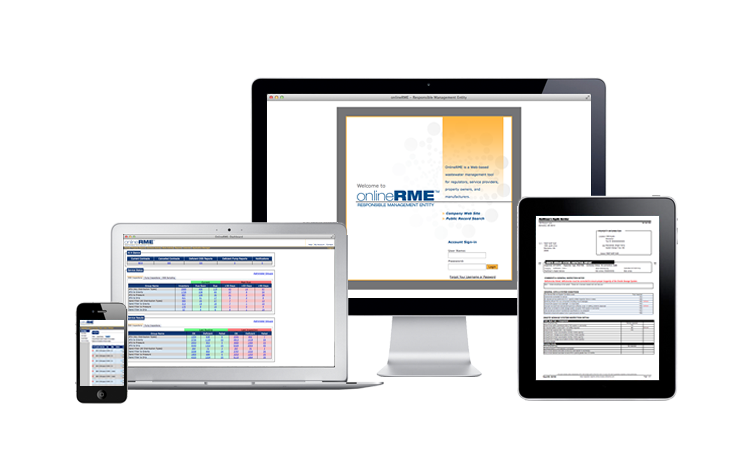
OnlineRME interface showing property and system records
OnlineRME connects property information, system details, and maintenance history in a single view so teams work from the same source of truth.

OnlineRME connects property information, system details, and inspection/pumping reports in one record so your team always has the full story.

  • Unified property records with system components and locations.
  • Chronological history of inspections, pumping, and corrections.
  • Flags for special conditions, failures, and restrictions.

Reporting requirements differ by jurisdiction. OnlineRME lets you configure forms, fields, and business rules so reports match your code and guidance.

  • Jurisdiction-specific inspection and pumping forms.
  • Required fields, acceptable ranges, and conditional logic.
  • Automatic reminders when reports or pumping are due.

Once your data is centralized, you can use it to understand workload, risk, and trends across your onsite program.

  • Lists and dashboards of overdue and at-risk systems.
  • Export tools for deeper analysis and mapping.
  • Support for multi-jurisdictional and regional programs.

Many jurisdictions use OnlineRME alongside permitting, billing, or GIS tools. The system is designed with data export and integration in mind.

  • Standard exports for use in GIS or data warehouses.
  • APIs and database connections for technical teams.
  • Support for phased integration as programs evolve.

How jurisdictions typically get started

Every implementation is a little different. This is a common pattern for new OnlineRME programs.

Magnifying glass over a program document Discover

Program walkthrough

We learn how your current program works, what tools you use today, and what you would like to change.

Gear and checklist representing configuration of forms and rules Configure

Forms & rules

We configure forms, reporting requirements, and workflows to match your code, policies, and risk model.

Group of people with a checkmark badge for onboarding contractors Prepare

Contractor onboarding

We help you communicate changes, update registration instructions, and support companies as they come online.

Rocket taking off to represent going live Launch

Go live & tune

As reports start flowing through the system, we help you adjust settings, troubleshoot questions, and plan for the next phase.